Svc::FileUplink Component
1 Introduction
FileUplink is an active F Prime component.
It manages uplink of files to the software deployment.
2 Requirements
| Requirement | Description | Rationale | Verification Method |
|---|---|---|---|
| FPRIME-FU-001 | FileUplink shall receive file packets, assemble them into files, and store the files in the on-board non-volatile storage. |
This requirement provides the capability to uplink files to the spacecraft. | Unit Test, System Test |
| FPRIME-FU-002 | FileUplink shall announce the completion of uplinked files. |
This requirement provides the capability to inform other components of newly uplinked files | Unit Test, System Test |
3 Design
3.1 Assumptions
The design of FileUplink assumes the following:
-
File uplink occurs by dividing files into packets of type
Fw::FilePacket. -
File access is sandboxed to a directory configured via
configure(directory). All uplinked file paths are validated against the sandbox directory before writing.
Warning
The sandbox is fail-closed: until configure(directory) is called, every open is
rejected with OUTSIDE_SANDBOX — an unconfigured FileUplink cannot write anywhere.
A deployment must call configure(directory) during topology setup to enable uplink
writes and to select the allowed base directory. Note that the stock FileHandling
subtopology configures the sandbox to "/" for backwards compatibility, which permits
writing to any absolute path accessible to the process. Security-conscious deployments
using that subtopology must call configure(directory) again from topology setup code
with a restricted directory; paths that resolve outside it — ../ traversal and absolute
paths — are then rejected.
-
In the nominal case of file uplink
a. Files are received one at a time. All packets of one file are received before receiving any packets of the next file.
b. Within a file, packets are received in order.
c. When the file is successfully uplinked (including verification of a valid set of packets), the file name is announced via the
fileAnnounceport.
3.2 Block Description Diagram (BDD)
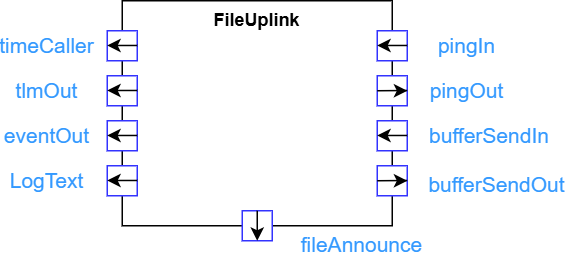
3.3 Ports
3.3.1 Role Ports
| Name | Type | Role |
|---|---|---|
timeCaller |
Fw::Time |
TimeGet |
tlmOut |
Fw::Tlm |
Telemetry |
eventOut |
Fw::LogEvent |
LogEvent |
3.3.2 Component-Specific Ports
| Name | Type | Kind | Purpose |
|---|---|---|---|
bufferSendIn |
Fw::BufferSend |
async input | Receives buffers containing file packets. |
bufferSendOut |
Fw::BufferSend |
output | Returns buffers for deallocation. |
pingIn |
Svc::Ping |
async input | Receives ping calls from Svc::Health for aliveness check |
pingOut |
Svc::Ping |
output | Returns ping request to Svc::Health to respond to liveness check |
fileAnnounce |
Svc::FileAnnounce |
output | Announces the receipt of an uplinked file |
3.4 State
FileUplink maintains the following state:
-
receiveMode: One of START or DATA, recording the type of the next packet that
FileUplinkexpects to receive. The initial value is START. -
lastSequenceIndex: An integer recording the sequence index of the last packet received. The initial value is zero.
-
file: An object representing the file, if any, that is currently open for writing. The underlying OS file is an
Os::SandboxedFile, which restricts write locations to a configured sandbox directory. -
lastPacketWriteStatus: The status of the last file write, used when deciding whether a duplicate packet may be skipped.
3.5 The bufferSendIn Port
FileUplink asynchronously receives buffers on
bufferSendIn.
Each buffer contains a file packet.
When FileUplink receives a buffer, it (a) determines the type
of the file packet in the buffer; (b) takes action as
specified in section below corresponding to the packet type; and (c)
invokes bufferSendOut
to return the buffer for deallocation.
3.5.1 START Packets
Upon receipt of a START packet, FileUplink does the following:
-
If receiveMode is not START, then close file and issue an InvalidReceiveMode warning.
-
Open file for writing.
-
If step 2 succeeded, then set lastSequenceIndex to zero and go to DATA mode; otherwise issue a FileOpenError warning and go to START mode.
3.5.2 DATA Packets
Upon receipt of a DATA packet P, FileUplink does the following,
where I is the
sequence index
of P:
-
If receiveMode is not DATA, then issue an InvalidReceiveMode warning and go to START mode.
-
Otherwise
a. If lastPacketWriteStatus is OK and I is equal to lastSequenceIndex, then issue a PacketDuplicate warning and skip the packet.
b. If I is not equal to lastSequenceIndex + 1, then issue a PacketOutOfOrder warning reporting lastSequenceIndex and I.
c. If the packet offset and size are in bounds for the current file, then
-
Using file, write the file data in the packet at offset specified in the packet.
-
If there was an error writing the file, then issue a FileWriteError warning. Record the write status in lastPacketWriteStatus.
d. Otherwise issue a PacketOutOfBounds warning.
-
3.5.3 END Packets
Upon receipt of an END packet P, FileUplink does the following:
-
If receiveMode is DATA, then do the following, where I is the sequence index of P:
a. If I is not equal to lastSequenceIndex + 1, then issue a PacketOutOfOrder warning reporting lastSequenceIndex and I.
b. Use file to do the following:
-
Use the method described in § 4.1.2 of the CCSDS File Delivery Protocol (CFDP) Recommended Standard to compute the checksum value for the file.
-
Compare the value computed in the previous step against the checksum value in the packet. If the two values are different, then issue a BadChecksum warning, increment the FilesReceivedFailed telemetry channel, and do not issue the FileReceived event or the
fileAnnounceoutput. Otherwise (the checksums match) issue the FileReceived event and, if connected, thefileAnnounceoutput, and increment the FilesReceived telemetry channel.
c. Close the file.
-
-
Otherwise issue an InvalidReceiveMode warning.
-
Set lastSequenceIndex to zero and go to START mode.
3.5.4 CANCEL Packets
Upon receipt of a cancel packet P, FileUplink does the following:
-
Set lastSequenceIndex to zero.
-
If receiveMode is not START, then close file.
-
Issue an UplinkCanceled event.
-
Go to START mode.
4 Dictionary
See FileUplink.fpp for a list of events and telemetry.
5 Checklists
| Checklist |
|---|
| Design |
| Code |
| Unit Test |
6 Unit Testing
Unit tests are located in Svc/FileUplink/test/ut. To run them: