Svc::PrmDb Component
1. Introduction
The Svc::PrmDb Component is used to store parameter values used by other components. The values are stored in serialized form. During initialization, Svc::PrmDb loads a set of parameters from a file, and stores the values in a table based on the parameter ID. Components that need parameters request their values during initialization after they have been loaded. Components occasionally receive updates to parameter values via a command, and the new values will be sent to Svc::PrmDb. A command will save the copy in memory back to the file.
2. Requirements
The requirements for Svc::TlmChan are as follows:
| Requirement | Description | Verification Method |
|---|---|---|
| PRMDB-001 | The Svc::PrmDb component shall load parameter values from a file |
Unit Test |
| PRMDB-002 | The Svc::PrmDb component shall provide an interface to read parameter values |
Inspection, Unit Test |
| PRMDB-003 | The Svc::PrmDb component shall provide an interface to update parameter values |
Inspection, Unit Test |
| PRMDB-004 | The Svc::PrmDb component shall provide a command to save the current parameter values |
Inspection, Unit Test |
| PRMDB-005 | The Svc::PrmDb component shall reject a PRM_LOAD_FILE command with an empty file name with a VALIDATION_ERROR response and a PrmDbFileLoadFailed event, without asserting or altering the staging database |
Unit Test, Integration Test |
3. Design
3.1 Context
3.1.1 Component Diagram
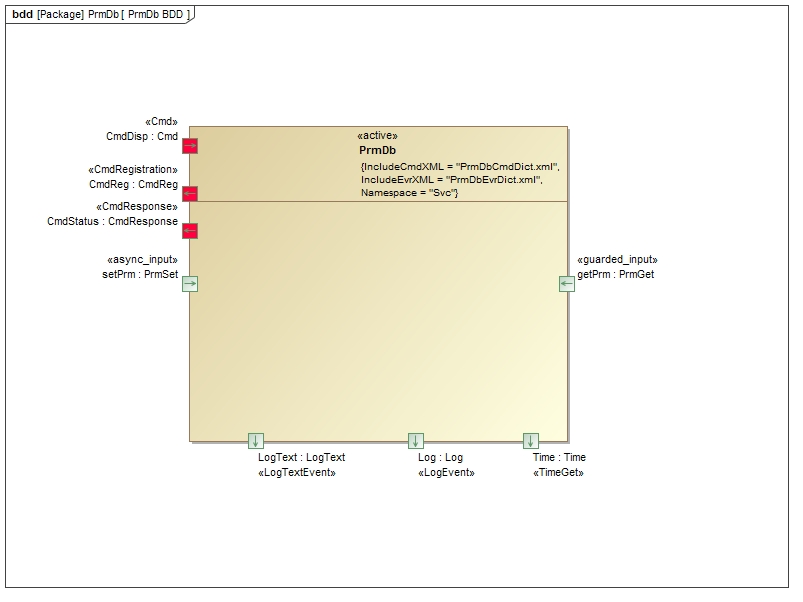
The Svc::PrmDb component has the following component diagram:
3.1.2 Ports
The Svc::PrmDb component uses the following port types:
| Port | Name | Direction | Type | Usage |
|---|---|---|---|---|
Fw::PrmGet |
getPrm | Input | Synchronous | Get a parameter |
Fw::PrmSet |
setPrm | Input | Asynchronous | Update a parameter |
3.2 Functional Description
The Svc::PrmDb component stores parameter values in a table by parameter ID. The table is mutex protected to prevent reading and writing from occurring at the same time. When the parameter file is read, the ID and serialized value are extracted and placed in the table. If an error occurs during the file load, any entries not successfully loaded will return a status to the getPrm port of PARAM_INVALID will be returned, otherwise PARAM_OK.
When a new parameter value is written to the setPrm port, the table in memory is updated, and the flag indicating a valid value is set.
When the component receives the PRM_SAVE_FILE command, it saves the entire table to the file, overwriting the old values. Unless the file is written, any parameter updates will be lost when the software is restarted.
The PRM_LOAD_FILE command loads a parameter file from an operator-supplied path into the staging database. Paths rejected by the sandbox emit a PrmFileReadError event with an OPEN stage. An empty file name is rejected before the load begins: the command emits PrmDbFileLoadFailed, returns VALIDATION_ERROR, and leaves the staging database and load state unchanged.
Warning
All PrmDb file access — the startup readParamFile read, PRM_SAVE_FILE writes, and
PRM_LOAD_FILE reads — goes through an Os::SandboxedFile restricted to the directory set by
configureSandbox(directory). The sandbox is fail-closed: until configureSandbox(directory)
is called every file open is rejected with OUTSIDE_SANDBOX. A deployment must call
configureSandbox(directory) during topology setup (before readParamFile) with a directory
that contains the store file set by configure(file). Note that the stock FileHandling and
FileHandlingCfdp subtopologies configure the sandbox to "/" for backwards compatibility,
which permits reading or writing any absolute path accessible to the process.
Security-conscious deployments using them must call configureSandbox(directory) again from
topology setup code with a restricted directory, after which ../ traversal and absolute paths
outside it are rejected. configure(file) sets the store-file name only and is not a sandbox.
The fields for each parameter value as stored in the parameter file are as follows:
| Description | Size (in bytes) | Value |
|---|---|---|
| Entry Delimiter | 1 | 0xA5 |
| Record Size | 4 | Id type size + number of bytes in parameter value |
| Parameter ID | Size of FwPrmIdType | Value of parameter ID |
| Parameter value | number of bytes in parameter | serialized bytes of value |
3.3 Scenarios
3.3.1 Parameter Load Scenario
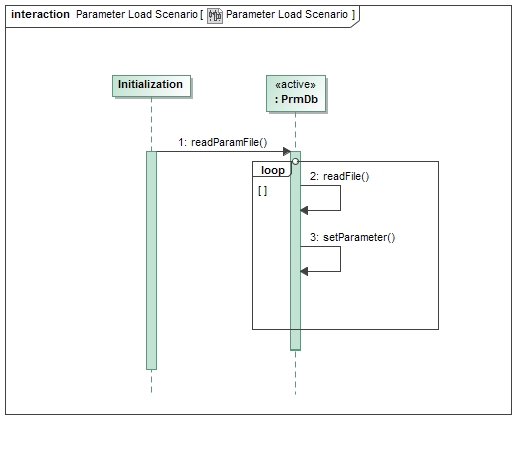
This diagram shows the scenario where parameters are loaded from a file.
3.3.2 Parameter Get/Set Scenario
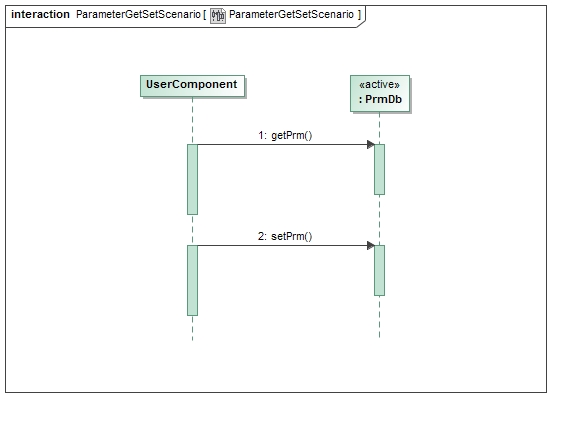
This diagram shows the scenario where parameters are retrieved and updated by components.
3.3.3 Parameter Save Scenario
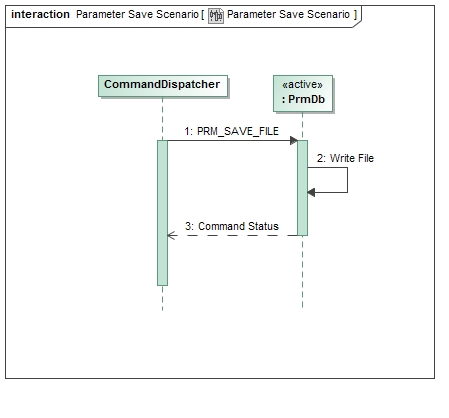
This diagram shows the scenario where parameters are saved to a file.
3.4 State
Svc::PrmDb has no state machines.
3.5 Algorithms
Svc::PrmDb has no significant algorithms.
4. Module Checklists
| Checklist |
|---|
| Design |
| Code |
| Unit Test |
5. Dictionary
TBD
6. Unit Testing
To see unit test coverage run fprime-util check --coverage
7. Change Log
| Date | Description |
|---|---|
| 7/15/2015 | Design review edits |
| 10/6/2015 | Unit test review edits |