Svc::ComLoggerDp
1. Introduction
The ComLoggerDp component logs Fw::ComBuffer buffers (e.g., framed telemetry, events, or command packets) to F Prime Data Product records. The component can be commanded to start recording data products, stop recording data product, or modify the priority of existing data products in progress. This component is meant to replace the ComLogger in deployments where data product management of Fw::ComBuffers is desired.
2. Requirements
| Name | Description | Validation |
|---|---|---|
| SVC-COMLOGGERDP-001 | The ComLoggerDp component shall log the contents of Com buffers received on its comIn port |
unit test |
| SVC-COMLOGGER-002 | The ComLoggerDp component shall have a command to start recording packets, specifying the number of packets per container | |
| SVC-COMLOGGER-003 | The ComLoggerDp component shall have a command to stop recording packets | |
| SVC-COMLOGGER-004 | The ComLoggerDp component shall have a command to modify the priority of existing data products | |
| SVC-COMLOGGER-005 | A public configure function will specify whether data product logging is initially enabled, and if enabled, the initial packets per container and priority |
3. Design
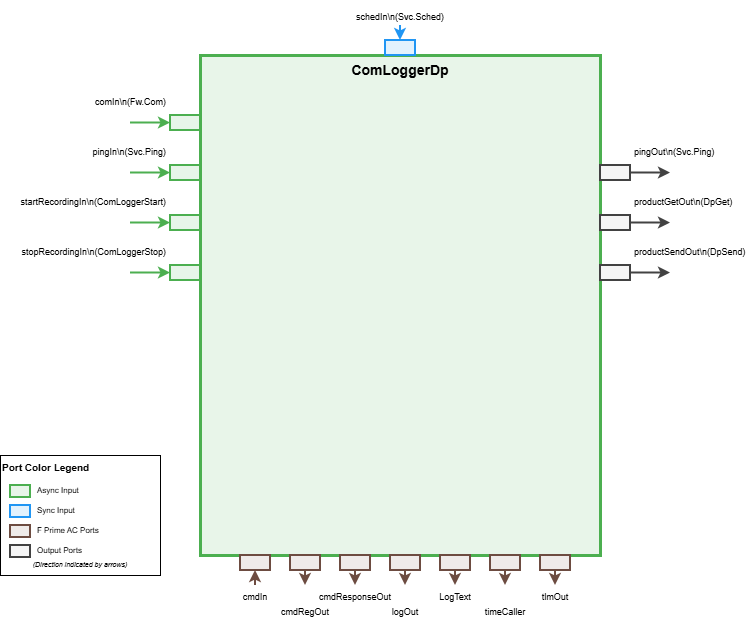
The ComLoggerDp is an active component. Com buffers arriving on the async comIn port are dispatched on the component's thread and written synchronously to data product records. The component maintains state for whether logging is enabled, the current container being filled, and the number of packets to pack per container.
3.1 Component Architecture
The component uses a stateful design that:
1. Allocates a data product container when logging is enabled and the first packet arrives
2. Serializes incoming Com buffers as records into the container
3. Sends the container when it reaches the configured packet count
4. Flushes any partial container when recording is stopped
5. Flushes any partial container after flushTimeout consecutive schedIn calls with no packet received (flushTimeout is the last argument of configure(), 0 disables auto-flush; with the 1 Hz rate group of §5.3, flushTimeout = 10 is a 10 s inactivity flush). A continuous stream never idles, so its containers close only at packetsPerContainer; a sparse stream with gaps longer than the timeout produces one data product per burst regardless of packetsPerContainer, each occupying a full ComLoggerDpBuffSize(packetsPerContainer) buffer and one DpCatalog file slot.
3.2 Port Description
3.2.1 Input Ports
| Port | Type | Description |
|---|---|---|
comIn |
Fw.Com |
Async port receiving Com buffers to be logged. Queue-full policy is drop: when the component queue is full, incoming buffers are discarded with no event; the cumulative count is reported in NumQueueDrops on the next schedIn cycle and is not reset by CLEAR_COUNTERS. Size the instance queue depth for the largest expected com burst between component task executions |
pingIn |
Svc.Ping |
Async port for health ping requests |
schedIn |
Svc.Sched |
Async port for periodic telemetry updates |
startRecordingIn |
Svc.ComLoggerStart |
Async port to start recording via port interface. Parameters: packetsPerContainer (FwSizeType), priority (FwDpPriorityType). Logs StartRecordingFailed event on validation failure. |
stopRecordingIn |
Svc.ComLoggerStop |
Async port to stop recording via port interface |
cmdIn |
Command receive | Standard command receive port |
3.2.2 Output Ports
| Port | Type | Description |
|---|---|---|
pingOut |
Svc.Ping |
Ping response port |
productGetOut |
Data product get | Port to request container buffers |
productSendOut |
Data product send | Port to send filled containers |
logOut |
Event | Event output port |
LogText |
Text event | Text event output port |
timeCaller |
Time get | Time stamp request port |
tlmOut |
Telemetry | Telemetry output port |
cmdResponseOut |
Command response | Standard command response port |
cmdRegOut |
Command registration | Standard command registration port |
3.3 State Variables
| Variable | Type | Initial Value | Description |
|---|---|---|---|
m_enabled |
bool |
false |
Whether data product logging is currently active |
m_container |
DpContainer |
- | Current data product container being filled |
m_packetsPerContainer |
FwSizeType |
0 |
Target number of packets per container |
m_currentPacketCount |
FwSizeType |
0 |
Current count of packets in the active container |
m_numBuffersLogged |
U32 |
0 |
Total number of buffers logged since initialization |
m_numBuffersDropped |
U32 |
0 |
Number of buffers dropped due to allocation failure |
m_priority |
FwDpPriorityType |
5 |
Priority for data product containers |
m_recordBuffer |
U8[MAX_RECORD_DATA_SIZE] |
- | Buffer for building records with sentry value followed by ComBuffer data |
m_schedCallsSinceLastPacket |
U32 |
0 |
Counter for schedIn calls since last packet received (used for auto-flush) |
m_flushTimeout |
U32 |
0 |
Number of schedIn calls without packets before auto-flush (0 = disabled) |
3.4 Configuration
The component uses constants defined in default/config/ComLoggerDpCfg.fpp and default/config/ComLoggerDpCfg.hpp for configuration:
| Constant | Defined in | Type | Default | Description |
|---|---|---|---|---|
DpBufferErrorThrottle |
ComLoggerDpCfg.fpp |
U32 |
1 |
Throttle value for DpBufferError event - limits the number of times the event can be emitted consecutively |
ComLoggerDpSentry |
ComLoggerDpCfg.hpp |
U32 |
0xDEADBEEF |
Sentry value prepended to each ComBuffer record for corruption detection during deserialization; must match the --sentry value given to scripts/decode_comlogger_dp.py |
These constants can be overridden in deployment-specific configuration files to tune behavior without modifying the component source.
Note on Sentry Values: Each ComBuffer record now includes a 4-byte sentry value prepended to the data. This sentry serves as a corruption detection mechanism that allows downstream deserialization code to validate record integrity. The sentry is serialized using F Prime's serialization to handle endianness correctly across platforms.
3.5 Initialization
The component requires calling configure(bool enabled, FwSizeType packetsPerContainer, FwDpPriorityType priority, U32 flushTimeout) during initialization to set the initial state:
enabled: Whether to enable logging immediatelypacketsPerContainer: Number of packets per container (validated > 0 if enabled)priority: Data product priorityflushTimeout: Number of schedIn calls without packets before auto-flushing partial container (0 = disabled)
If enabled is true, the function validates packetsPerContainer exactly as StartComDp does (> 0 and the resulting container size fits in a U32) and enables logging with the specified configuration; an invalid value is a programming error and triggers FW_ASSERT (no StartRecordingFailed event is emitted). If enabled is false, the packetsPerContainer and priority parameters are ignored but flushTimeout is still stored. Typically enabled is set to false, and logging is started later via command or port.
3.5 Commands
| Command | Opcode | Parameters | Description |
|---|---|---|---|
StartComDp |
0x00 | packetsPerContainer: FwSizeTypepriority: FwDpPriorityType |
Starts recording Com buffers into data products with the specified configuration. Validates that packetsPerContainer > 0 and that the resulting container size fits in a U32 (packetsPerContainer <= (U32 max - Fw::DpContainer::MIN_PACKET_SIZE) / RECORD_SIZE, where RECORD_SIZE = SIZE_OF_ComBufferRecord_RECORD(MAX_RECORD_DATA_SIZE) and MAX_RECORD_DATA_SIZE = FW_COM_BUFFER_MAX_SIZE + sizeof(ComLoggerDpSentry)). If validation fails, logs StartRecordingFailed event and returns VALIDATION_ERROR. If recording is already active with a partial container, sends the partial container before reconfiguring. Logs ComDpStarted event on success. |
UpdatePriority |
0x01 | priority: FwDpPriorityType |
Updates the priority of the currently active container (if any) and stores the priority for future containers. Logs PriorityUpdated event. |
StopComDp |
0x02 | None | Stops recording and sends any partial container. Logs ComDpStopped event indicating whether a partial container was sent. |
CLEAR_COUNTERS |
0x03 | None | Clears the NumBuffersLogged and NumBuffersDropped telemetry counters to 0 and resets the DpBufferError event throttle. Logs CountersCleared event. |
3.6 Events
| Event | ID | Severity | Parameters | Throttle | Description |
|---|---|---|---|---|---|
DpBufferError |
0x00 | WARNING_HI | size: U32 |
DpBufferErrorThrottle (default: 1) |
Error getting data product buffer of the requested size |
ComDpStarted |
0x01 | ACTIVITY_HI | packetsPerContainer: FwSizeType |
None | Recording started with specified configuration |
ComDpStopped |
0x02 | ACTIVITY_HI | partialContainer: PartialContainerStatus |
None | Recording stopped; SENT if a partial container was sent, NOT_SENT otherwise |
PriorityUpdated |
0x03 | ACTIVITY_LO | priority: FwDpPriorityType |
None | Data product priority updated |
CountersCleared |
0x04 | ACTIVITY_LO | None | None | Counters and throttles cleared |
StartRecordingFailed |
0x05 | WARNING_LO | packetsPerContainer: FwSizeType |
None | Failed to start recording due to invalid configuration (packetsPerContainer is 0 or exceeds the container-size limit given for StartComDp) |
3.7 Telemetry
| Channel | ID | Type | Description |
|---|---|---|---|
LoggingEnabled |
0x00 | bool |
Whether data product logging is currently active |
NumBuffersLogged |
0x01 | U32 |
Total number of Com buffers logged since initialization |
NumBuffersDropped |
0x02 | U32 |
Number of Com buffers dropped due to container allocation failure |
NumQueueDrops |
0x04 | U32 |
Number of messages dropped from the component's queue due to queue full condition |
Telemetry is written periodically when the schedIn port is invoked (typically connected to a rate group).
Note on Auto-Flush: If flushTimeout is configured > 0, the schedIn handler also checks for auto-flush conditions. When logging is enabled with a partial container and no packets have arrived for flushTimeout consecutive schedIn calls, the partial container is automatically flushed. This prevents stale data from sitting indefinitely in memory.
3.8 Data Products
3.8.1 Records
| Record | ID | Type | Description |
|---|---|---|---|
ComBufferRecord |
0 | U8 array |
Variable-length array containing a 4-byte sentry value (serialized with proper endianness) followed by Com buffer data |
3.8.2 Containers
| Container | ID | Default Priority | Description |
|---|---|---|---|
ComBuffContainer |
0 | 5 | Container holding multiple Com buffer records |
3.9 Internal Helper Functions
The component uses private helper functions to share logic between command handlers and port handlers:
startRecordingInternal(FwSizeType packetsPerContainer, FwDpPriorityType priority): Validates parameters, stores configuration, enables logging, and logs event. If recording is already active with a partial container, sends the partial container before reconfiguring. On validation failure, disables logging and returnsFw::Success::FAILURE. ReturnsFw::Success::SUCCESSon success.stopRecordingInternal(): Sends any partial container, disables logging, logs event, and returns aPartialContainerStatusindicating whether a partial container was sent.handleBufferDrop(U32 size): LogsDpBufferErrorevent (with throttling) and incrementsm_numBuffersDroppedcounter. Called when a buffer must be dropped due to allocation failure.allocateAndSetupContainer(): Allocates a new data product container with size calculated to holdm_packetsPerContainerrecords (each with sentry + ComBuffer data), sets the priority tom_priority, and returnsFw::Success::SUCCESSon success. On allocation failure, callshandleBufferDrop()and returnsFw::Success::FAILURE.serializePacket(const U8* dataPtr, FwSizeType dataSize): Builds a record with sentry value followed by ComBuffer data inm_recordBuffer, then serializes it into the current container. Uses assertions to ensure serialization succeeds (containers are pre-sized correctly).sendContainerIfNonEmpty(): Sends the current container if logging is enabled and it has any packets viaproductSendOut, resetsm_currentPacketCountto 0, and returns aPartialContainerStatusindicating whether a container was sent. Handles both full and partial containers. Note thatdpSend()invalidates the container; a new one will be allocated when the next packet arrives.finalizeContainer(): Delegates tosendContainerIfNonEmpty()to send the current container.
This design allows both command-based and port-based control to use the same implementation, provides consistent error handling across different failure modes, and encapsulates the complexity of sentry value handling and container management.
3.10 Operational Flow
3.10.1 Starting Recording
StartComDpcommand orstartRecordingInport is invokedstartRecordingInternal()validatespacketsPerContainer > 0- If validation fails, disable logging and return failure
- Command handler sends
VALIDATION_ERRORresponse and logsStartRecordingFailedevent - Port handler logs
StartRecordingFailedevent - If recording is already active with a partial container, send it before reconfiguring
- Configuration is stored and logging is enabled
ComDpStartedevent is logged- Component awaits incoming Com buffers
3.10.2 Recording Com Buffers
- Com buffer arrives on
comInport - If not enabled, return immediately
- Reset auto-flush counter:
m_schedCallsSinceLastPacket = 0 - If
m_currentPacketCount == 0, callallocateAndSetupContainer() - Allocates a new container with size for
m_packetsPerContainerrecords (including sentry overhead) - Sets container priority to
m_priority - If allocation fails,
handleBufferDrop()is called and handler returns - Call
serializePacket()to serialize the packet with sentry: - Build record in
m_recordBuffer: serialize sentry value (handles endianness), then append ComBuffer data - Serialize the record into the container
- Assertions ensure serialization succeeds (containers are pre-sized correctly)
- Increment
m_currentPacketCountandm_numBuffersLogged - If container is full (
m_currentPacketCount >= m_packetsPerContainer): - Call
finalizeContainer()to send container and reset count
3.10.3 Auto-Flush on Inactivity
If flushTimeout is configured > 0 during configure():
schedInport is invoked periodically (typically 1 Hz)- Check auto-flush conditions:
- Logging must be enabled (
m_enabled == true) - Partial container must exist (
m_currentPacketCount > 0) - Timeout must be configured (
m_flushTimeout > 0) - If all conditions met, increment
m_schedCallsSinceLastPacket - If
m_schedCallsSinceLastPacket >= m_flushTimeout: - Call
finalizeContainer()to send the partial container - Reset
m_schedCallsSinceLastPacket = 0 - Write telemetry channels
Important: The m_flushTimeout > 0 check is critical. Without it, setting flushTimeout = 0 would cause immediate flush on every schedIn call (since 0 >= 0 is true). With the check, flushTimeout = 0 completely disables auto-flush.
Counter Resets: The m_schedCallsSinceLastPacket counter is reset to 0 when:
- A packet arrives via comIn (activity detected)
- startRecordingInternal() is called (recording starts/reconfigures)
- stopRecordingInternal() is called (recording stops)
- Auto-flush triggers and sends a container
Example: With flushTimeout = 10 and schedIn connected to a 1 Hz rate group:
- Packets arrive and fill container to 3 of 10 capacity
- No more packets arrive for 10 seconds
- On the 10th schedIn call, the partial container with 3 packets is automatically flushed
- This prevents stale data from sitting indefinitely in memory
3.10.4 Stopping Recording
StopComDpcommand orstopRecordingInport is invokedstopRecordingInternal()checks for partial container- If partial container exists, send it via
productSendOut - Disable logging and reset auto-flush counter
- Log
ComDpStoppedevent indicating whether a partial container was sent
4. Unit Tests
Unit tests are located in test/ut/. Each test case that validates a requirement records it with the REQUIREMENT macro from Fw/Test/UnitTest.hpp, so requirement traceability is derived from the test code.
5. Usage
5.1 Component Instantiation
5.2 Initialization
// Initialize component with queue depth and instance ID
comLogger.init(QUEUE_DEPTH, INSTANCE_ID);

// Configure initial state (typically disabled)
// Parameters: enabled, packetsPerContainer, priority, flushTimeout
// flushTimeout: Number of schedIn calls without packets before auto-flush (0 = disabled)
comLogger.configure(false, 0, 0, 10);  // Auto-flush after 10 idle schedIn calls

// Alternative: Configure with logging initially enabled
// comLogger.configure(true, 100, 5, 10);  // 100 packets per container at priority 5, auto-flush after 10 idle cycles

// Alternative: Disable auto-flush
// comLogger.configure(false, 0, 0, 0);  // flushTimeout=0 disables auto-flush
Use the public helper function ComLoggerDpBuffSize to get the size
of buffers needed to support the ComBuffer data products. This size
can be used for Svc::BufferManager or equivalent.
5.3 Port Connections
Typical Deployment Connections
// Connect Com input from framer or other Com source
framer.comOut[0].connect(comLogger.comIn[0]);

// Connect command ports
cmdDisp.compCmdSend[ID].connect(comLogger.cmdIn[0]);
comLogger.cmdRegOut[0].connect(cmdDisp.compCmdReg[ID]);
comLogger.cmdResponseOut[0].connect(cmdDisp.compCmdStat[ID]);

// Connect data product ports
comLogger.productGetOut[0].connect(dpWriter.bufferGetIn[0]);
comLogger.productSendOut[0].connect(dpWriter.bufferSendIn[0]);

// Connect event and telemetry ports
comLogger.logOut[0].connect(eventLogger.LogRecv[ID]);
comLogger.tlmOut[0].connect(chanTlm.TlmRecv[ID]);
comLogger.timeCaller[0].connect(timeSource.timeGetPort[ID]);

// Connect sched port for periodic telemetry updates
rateGroup1Hz.RateGroupMemberOut[ID].connect(comLogger.schedIn[0]);

// Optional: Connect ping ports for health monitoring
health.PingOut[ID].connect(comLogger.pingIn[0]);
comLogger.pingOut[0].connect(health.PingIn[ID]);

// Optional: Connect port-based start/stop for external control
externalControl.startOut[0].connect(comLogger.startRecordingIn[0]);
externalControl.stopOut[0].connect(comLogger.stopRecordingIn[0]);
5.4 Command Usage
Starting Recording via Command
This starts recording with 100 Com buffers per data product container at priority 5.
Updating Priority via Command
This updates the current container's priority (if active) and all future containers to priority 10.
Stopping Recording via Command
This stops recording and sends any partial container.
5.5 Port-Based Control
The component can also be controlled via ports for integration with autonomous flight software or other components:
// Start recording with separate parameters
FwSizeType packetsPerContainer = 100;
FwDpPriorityType priority = 5;
comLogger.get_startRecordingIn_InputPort(0)->invoke(packetsPerContainer, priority);

// Stop recording
comLogger.get_stopRecordingIn_InputPort(0)->invoke();
5.6 Telemetry Monitoring
Monitor the following telemetry channels:
LoggingEnabled: Boolean indicating if logging is activeNumBuffersLogged: Total count of Com buffers logged since initializationNumBuffersDropped: Count of Com buffers dropped due to allocation failures
5.7 Typical Use Case: Downlink Recording
A common deployment pattern:
- System boots with
comLogger.configure(false, 0, 0, 10)- logging disabled, auto-flush after 10 idleschedIncalls - Ground sends command to start high-rate telemetry recording when radio link is lost:
- Component records all Com traffic (telemetry, events) to data products
- When link is re-established, ground commands:
- Data products are downlinked via the data product manager
- Ground can reconstruct the full telemetry stream from the data products using `decode_comlogger_dp.py in the scripts directory.
6. Change Log
| Date | Description |
|---|---|
| 2026-09-23 | Initial implementation with commands, ports, events, telemetry, and comprehensive unit tests |